The Markdown editor that fits in 3.8 MB.
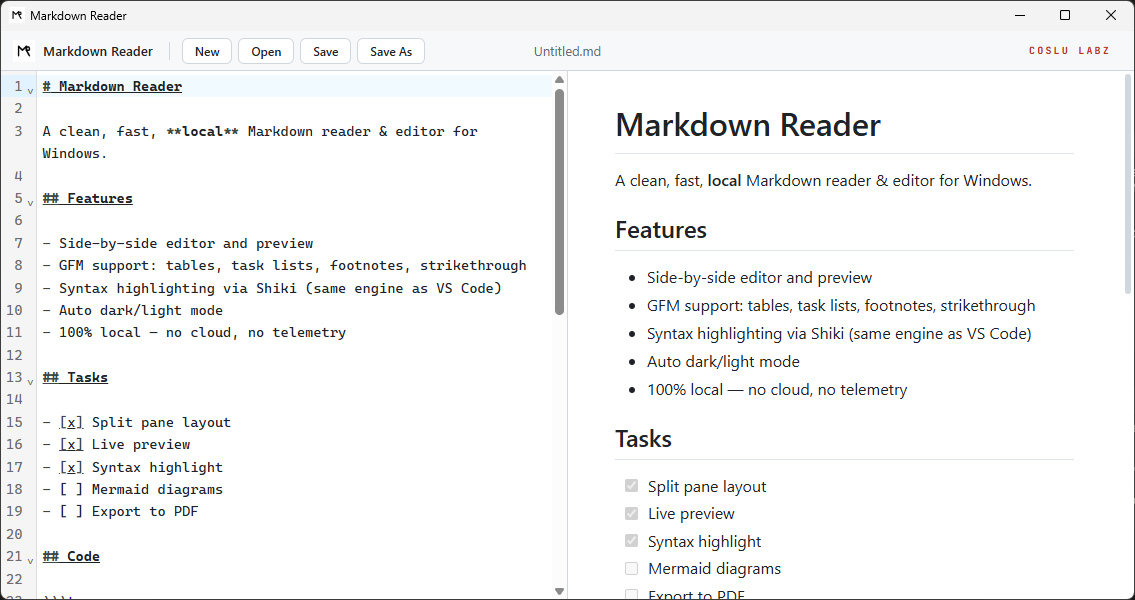
Tauri + Rust, no Electron, no cloud, no login. Split-pane, full GFM, Shiki syntax highlighting — the same engine VS Code uses. Sub-second cold start, 80 MB RAM at idle.
Markdown editors became browsers in disguise.
The ecosystem gives you two options: heavyweight Electron (Obsidian, Typora — 200 MB+ baseline) or tools that barely render beyond plain text. We wanted something that opens in under a second, uses 80 MB of RAM, and renders full GitHub-Flavored Markdown. So we built it.
What this product actually does.
Live split-pane
Editor on the left, preview on the right, in real time. CodeMirror 6 + Allotment — the same combo serious IDEs use.
Full GitHub-Flavored Markdown
Tables, task lists, strikethrough, footnotes, emojis, anchors. markdown-it with the mature plugin ecosystem — no toy parser here.
| col | val |
|---|---|
Shiki syntax highlight
The same engine VS Code runs. Code blocks in the preview are pixel-identical to your favorite editor.
Native shortcuts
Ctrl+N new · Ctrl+O open · Ctrl+S save · Ctrl+Shift+S save as. The exact behavior Windows expects.
File association
Registers `.md`, `.markdown`, `.mdown`, `.mkd`, `.mdx`. "Open with → MarkdownReader" right from Windows Explorer.
Auto dark/light
Follows the OS theme automatically. No manual switch, no saved preference — Windows decides.
Why these technical choices.
Why Tauri (not Electron)
Electron bundles the entire Chromium (~150 MB). Tauri uses WebView2 already shipped with Windows — only your app gets distributed. Result: a 3.8 MB installer instead of 150+.
CodeMirror 6 — IDE-grade editor engine
The same engine powering Replit, Codepen, Discord, Sourcegraph. Long-text performance, robust undo, real extensibility. Not a fancy textarea.
Rendering faithful to GitHub and VS Code
markdown-it covers 100% of the GFM spec. Shiki ports the VS Code tokenizer to the browser via TextMate grammars — the highlight is the same, not an approximation.
The spec sheet.
- Installer size
- 3.8 MB
- Disk footprint
- ~11 MB
- Idle RAM
- ~80 MB
- Cold start
- < 1s
- Platforms
- Windows 10/11 · x64
- License
- MIT
- Current version
- v0.1.0
Where we are · where we’re going.
- [×] Split-pane editor + preview done
- [×] Live preview done
- [×] Syntax highlight (Shiki) done
- [×] GitHub-Flavored Markdown done
- [×] File association + Open With done
- [ ] Mermaid diagrams planned
- [ ] Export to PDF planned